

How to Make Affirmation Videos That Inspire and Motivate
Making an affirmation video is more than just putting words and images together. When done right, these videos can boost confidence, calm anxiety, and help people believe in themselves. If you want to make affirmation videos that truly help others, you need more than just a good camera or editing software—you need a plan, creativity, and a clear understanding of what makes affirmations work.
In this guide, you’ll learn everything you need to know to create affirmation videos that stand out, connect with viewers, and have a positive impact.
Understanding Affirmation Videos
Affirmation videos are short or long recordings that display positive statements, often mixed with music, images, or voices. The purpose is to help the viewer repeat and internalize positive beliefs about themselves and their lives. Many people use these videos as part of their daily routine for self-improvement, motivation, or mental health.
What makes affirmation videos powerful is not just the words, but also the way they are presented. The combination of visual, audio, and emotional elements helps the brain absorb the affirmations more deeply. When people watch these videos regularly, it can change the way they think and feel about themselves.
Why Make Affirmation Videos?
Before you start, it’s important to know why affirmation videos are so popular and helpful:
- Accessible self-help: Anyone can watch them, anytime, anywhere.
- Emotional support: Helps people cope with stress, anxiety, or negative thinking.
- Habit-building: Encourages daily positive routines.
- Engagement: Videos are more engaging than plain text or audio alone.
- Community: Sharing your videos can help others and even build a supportive following.
Creating your own affirmation video can also boost your own positivity, as you become more aware of the messages you want to share.

Credit: www.tunepocket.com
Planning Your Affirmation Video
Making a great affirmation video starts with a solid plan. Here are the key steps you should follow:
1. Define Your Purpose And Audience
Think about who your video is for and what you want to achieve. Are you making a video for people who need confidence? Is it for stress relief or to help with sleep? Knowing your purpose helps you choose the right affirmations and style.
Some common audiences include:
- Students needing motivation
- People dealing with anxiety
- Those wanting to build self-esteem
- Professionals facing stress at work
When you know your audience, you can use words, images, and music that fit their needs.
2. Choose The Affirmations
The heart of your video is the affirmations themselves. Choose statements that are:
- Positive and clear
- Written in the present tense (“I am,” “I have”)
- Specific, but not too long
- Believable and realistic
Examples:
- “I am confident and capable.”
- “I trust the process of life.”
- “My mind is calm and focused.”
You can write your own or use popular affirmations, but always make sure they match your purpose.
Tip: Beginners often pick too many affirmations. Instead, focus on 10-20 strong statements to avoid overwhelming the viewer.
3. Decide On The Video Length
Short videos (1-3 minutes) are easier to watch daily, while longer ones (10-30 minutes) can be used for meditation or sleep. Consider your audience’s attention span and where they will use the video.
Insight: Many viewers prefer looping videos for background use, especially for sleep or study.
4. Plan The Visuals
Think about the style of visuals you want:
- Nature scenes for relaxation
- Urban settings for motivation
- Simple backgrounds for focus
Visuals should match the mood of your affirmations. Avoid images that are too busy or distracting.
5. Select The Music Or Sounds
Music is a powerful tool in affirmation videos. Choose gentle, uplifting tunes or soothing nature sounds. Avoid music with strong lyrics, as this can distract from the affirmations.
Tip: Many beginners forget to check the copyright status of music. Use royalty-free tracks or original compositions to avoid legal issues.
Writing Effective Affirmations
The affirmations you use are the most important part of your video. Here’s how to write them well:
- Start with “I am” or “I have.” This puts the message in the present.
- Keep sentences short and positive.
- Avoid negatives like “not” or “don’t.”
- Make them believable—statements that are too extreme can feel fake.
- Focus on what you want to feel or achieve, not what you want to avoid.
Example:
Instead of “I am not afraid,” use “I am brave and strong. ”
Non-obvious Insights
- Repetition matters: Repeating the same affirmation several times in a video helps it sink in. Don’t worry about being too repetitive—this is a key feature, not a flaw.
- Vary intensity: Mix strong statements (“I am powerful”) with gentle ones (“I allow myself to rest”). This keeps the video engaging and covers different needs.
Gathering Your Resources
Before you start creating, collect everything you need:
- Text file with your chosen affirmations
- Images or video clips for your background
- Music or sound effects (royalty-free or original)
- Voice recording (optional, for spoken affirmations)
- Video editing software (see comparison below)
Here’s a quick comparison of some popular video editing tools:
| Software | Platforms | Ease of Use | Free/Paid |
|---|---|---|---|
| iMovie | Mac, iOS | Easy | Free |
| Adobe Premiere Pro | Windows, Mac | Intermediate | Paid |
| DaVinci Resolve | Windows, Mac, Linux | Intermediate | Free/Paid |
| CapCut | Windows, Mac, Mobile | Very Easy | Free |
Recording Affirmations (voiceover)
Many affirmation videos use a voiceover to read the affirmations aloud. A calm, clear voice can help viewers feel more connected and focused. Here’s how to record a good voiceover:
- Choose a quiet room with minimal background noise.
- Use a good-quality microphone. A simple USB mic is usually enough for beginners.
- Read your affirmations slowly and clearly, with a warm tone.
- Pause slightly between each affirmation for reflection.
- Record in short sections so you can easily fix mistakes.
Practical Tip: Avoid sounding robotic. Smile as you read—your voice will sound more positive and friendly.
Creating Visuals For Your Video
Visuals are what make your affirmation video engaging. You have several options:
1. Stock Images And Video Clips
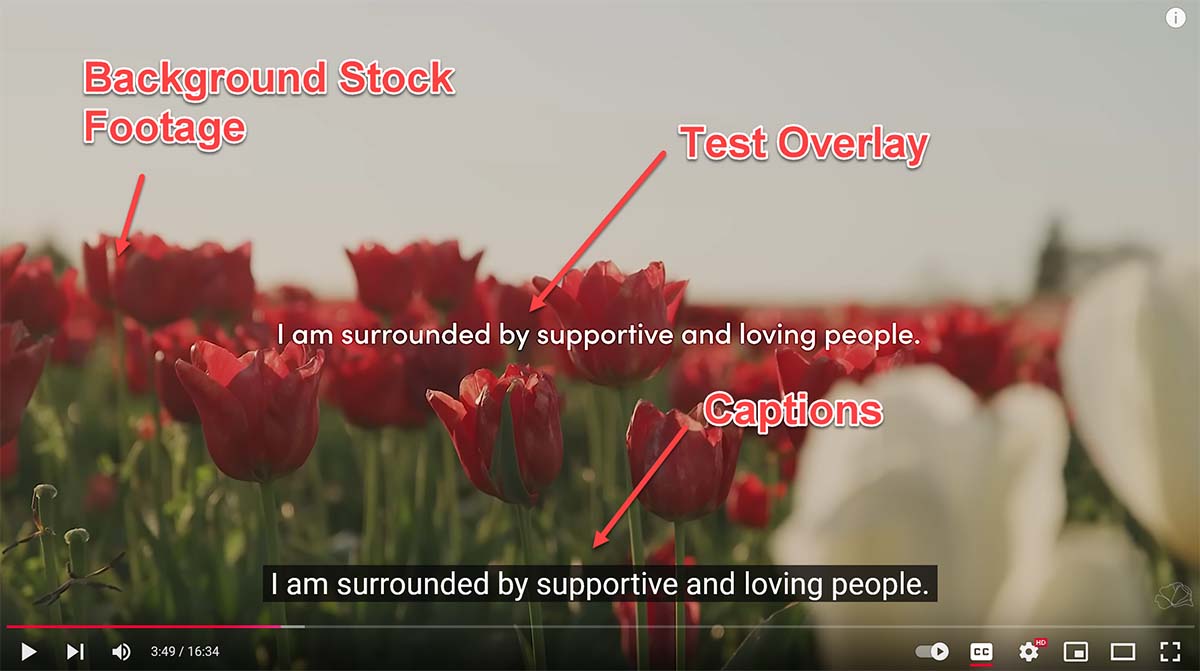
Websites like Unsplash, Pexels, and Pixabay offer free high-quality images and videos. Choose visuals that:
- Match the mood of your affirmations
- Are not too distracting
- Have a consistent style
2. Custom Footage
You can film your own scenes with a smartphone or camera. Simple shots of nature, cityscapes, or calming spaces work well. Keep the camera steady and avoid too much movement.
3. Animation Or Motion Graphics
Animated text or simple graphics can make your video feel modern and professional. Many editing tools offer easy templates for this.
Non-Obvious Insight: Subtle motion (like drifting clouds or flowing water) keeps viewers’ attention longer than static images.
Adding Music And Sound
The right music can help set the tone for your affirmation video. Here’s what to keep in mind:
- Choose instrumental music or nature sounds
- Keep the volume low so your voice (if used) is clear
- Make sure you have permission to use the music
There are many websites with free or affordable royalty-free music, such as Free Music Archive or YouTube Audio Library.
Common Mistake: Beginners often choose music that’s too dramatic or fast-paced. Stick to gentle, uplifting, or ambient tracks.
Editing Your Affirmation Video
Once you have all your elements (affirmations, visuals, music, and voiceover), it’s time to put them together.
Basic Editing Steps
- Import your visuals into the video editor.
- Arrange images or clips in the order you want.
- Add your affirmation text or voiceover.
- Insert music or sound effects.
- Sync the timing: Each affirmation should be on screen long enough to read or repeat.
- Adjust audio levels so the music does not overpower the voice.
- Add simple transitions for smooth changes between scenes.
Example Timeline
A simple 2-minute affirmation video might look like this:
- 0: 00–0:10: Opening scene with gentle music, title text
- 0: 10–1:50: Loop of 10 affirmations, each on screen for 8–10 seconds, with matching visuals and voiceover
- 1: 50–2:00: Closing message or call to action
Helpful Features To Use
- Text animation: Fades, slides, or typewriter effects keep text interesting.
- Color grading: Adjust colors to create a calm or vibrant mood.
- Subtitles: Add text for hearing-impaired viewers or for silent watching.
Exporting And Sharing Your Video
When your video is finished, it’s time to share it with the world. Here’s how to do it right:
- Export settings: Choose a common format like MP4. Use HD quality (at least 720p) for clarity.
- File size: Keep the file size manageable for easy uploading.
- Platform: Decide where to upload—YouTube, Instagram, Facebook, TikTok, or your own website.
- Description: Write a helpful description with keywords like “affirmation video,” “positive thinking,” or “self-confidence.”
- Thumbnail: Create a simple, eye-catching thumbnail. Use large text and bright colors to grab attention.
Pro Tip: Adding subtitles can increase views, as many people watch videos with the sound off.
Measuring Success: What Works And What Doesn’t
Not every affirmation video will go viral, but you can still measure your impact:
- Views and watch time: Are people watching your video to the end?
- Likes, comments, and shares: Positive feedback means your message is resonating.
- Subscriber growth: More followers mean your style is working.
- Direct messages: Viewers may share how your video helped them—these stories are priceless.
Data Comparison
Here’s a look at how different types of affirmation videos perform on popular platforms:
| Video Type | Average Watch Time | Engagement Level | Best Platform |
|---|---|---|---|
| Short (1-3 mins) | High | Moderate | Instagram, TikTok |
| Medium (5-10 mins) | Moderate | High | YouTube |
| Long (20+ mins, looped) | Very High (for sleep/meditation) | Moderate | YouTube, Facebook |
Insight: Short videos often get more initial views, but longer videos build more loyal followers and get higher watch time.
Common Mistakes To Avoid
It’s easy to make mistakes when creating your first affirmation video. Watch out for these:
- Using too many affirmations—quality matters more than quantity
- Picking music that’s distracting or too loud
- Overloading the visuals with effects or text
- Not checking copyright rules for images and music
- Skipping subtitles or captions
- Forgetting to adjust audio levels (voice and music should blend well)
- Making videos too long for your audience’s attention span
Practical Tips For Better Affirmation Videos
- Test with friends: Share your draft video with a few people and ask for feedback.
- Use your own voice: Even if it feels awkward, a real voice (not computer-generated) is more comforting.
- Practice reading affirmations: The more natural you sound, the better the impact.
- Update your videos: Keep things fresh by making new videos or updating old ones with new affirmations.
- Watch others: Study popular affirmation videos to see what works and what doesn’t.
Examples Of Popular Affirmation Video Styles
To give you some inspiration, here are a few common styles and why they work:
- Minimalist: Simple white text on a calm background with soft music. Focuses attention on the words.
- Nature themed: Videos of forests, oceans, or mountains with gentle affirmations. Relaxing and visually appealing.
- Animated: Fun graphics and animated text, often for kids or younger audiences.
- Voice-only: Audio with a black screen or simple background, perfect for bedtime listening.
Each style has its own strengths. Choose what fits your audience and your own creative style.
Legal And Ethical Considerations
Affirmation videos are meant to help people, so it’s important to be responsible:
- Use only images, videos, and music that you have permission to use.
- Avoid making health claims that you can’t back up.
- Respect privacy—don’t use other people’s voices or images without consent.
For more on copyright and fair use, visit U.S. Copyright Office.
Going Beyond: Building A Community
If you plan to make more than one affirmation video, think about building a community. Respond to comments, ask for suggestions, and encourage viewers to share their favorite affirmations. This makes your channel or page more interactive and supportive.
Some creators even host live affirmation sessions or create downloadable versions for viewers. The more you engage, the stronger your impact.
Frequently Asked Questions
What Is The Best Length For An Affirmation Video?
The Ideal Length Depends On The Purpose And Platform. For Daily Motivation, 1-3 Minutes Is Enough. For Meditation Or Sleep, 10-30 Minutes Or Even Longer Works Well. Always Match Your Video Length To Your Audience’s Needs.
Credit: www.tunepocket.com
Should I Use My Own Voice Or Text-only?
Both Options Work. Using Your Own Voice Makes The Video More Personal And Comforting. Text-only Is Easier To Create And Useful For Silent Watching. Many Creators Use Both—spoken Affirmations With On-screen Text.
Where Can I Find Free Music And Visuals For My Video?
Websites Like Pexels, Unsplash, And Pixabay Offer Free Images And Video Clips. For Music, Try The Youtube Audio Library Or Free Music Archive. Always Check The License Before Using Any Content.
How Often Should I Update My Affirmation Videos?
It’s Good To Update Or Add New Affirmation Videos Every Few Weeks. This Keeps Your Content Fresh And Gives Your Audience More Variety. You Can Also Ask Viewers For Their Favorite Affirmations To Include.
What Are The Biggest Mistakes To Avoid When Making Affirmation Videos?
The Most Common Mistakes Are Using Too Many Affirmations, Picking Distracting Music, Ignoring Copyright Rules, And Making The Video Too Busy Or Long. Focus On Quality, Clarity, And Simplicity For The Best Results.
Making affirmation videos can be rewarding for both you and your viewers. With a bit of planning, creativity, and care, you can create content that inspires, comforts, and uplifts people every day.

Credit: www.youtube.com
