

How to Make Affirmation Cards on Canva: Step-by-Step Guide
How To Make Affirmation Cards On Canva
Affirmation cards have become a popular tool for self-growth, positive thinking, and daily encouragement. People use them to boost confidence, manage stress, or set intentions for the day. The beauty of affirmation cards is in their simplicity—they carry short, powerful messages that can shift your mindset in seconds.
If you’ve ever wanted your own personalized deck, you don’t need to be a designer or spend a fortune ordering custom cards. You can make beautiful, inspiring affirmation cards easily with Canva, an online design platform that’s both user-friendly and feature-rich.
This guide will walk you through every step of creating affirmation cards on Canva, from brainstorming messages to printing your cards. Whether you want to create a deck for yourself, as a thoughtful gift, or for clients and friends, you’ll learn everything you need for a successful project.
Along the way, you’ll discover practical tips, common beginner mistakes to avoid, and how to add your unique touch to each card.
Why Create Your Own Affirmation Cards?
Designing your own affirmation cards gives you full creative freedom. You can select messages that truly resonate with you, match the colors and themes to your style, and even add personal touches like photos or symbols. Handmade or custom-designed cards often feel more meaningful than generic, store-bought decks.
Other benefits include:
- Personal relevance: Each card speaks to your unique goals and challenges.
- Creative expression: Customize fonts, colors, and images for a deck you love.
- Gift potential: Personalized cards make memorable, heartfelt gifts.
- Business value: Coaches, therapists, and teachers can use custom decks to support clients or students.
Plus, making your own cards is fun! The process itself is a form of self-care and mindfulness.
Understanding Affirmation Cards
Before you start designing, it helps to understand what affirmation cards are and how they’re used. An affirmation card is a small card, usually the size of a playing card, with a positive statement or message printed on it. These cards are often used for:
- Daily inspiration: Pick a card each morning to set a positive tone for your day.
- Mindfulness practice: Reflect on the message to encourage gratitude, self-love, or focus.
- Therapeutic support: Use as a gentle reminder during stressful times or therapy sessions.
- Goal reinforcement: Keep your intentions front and center.
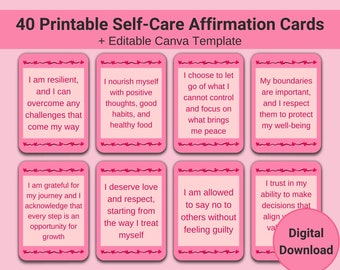
Good affirmation cards are concise, uplifting, and easy to read. They often use “I am” statements or positive commands (e. g. , “I am strong” or “Believe in yourself”). The design should make the message easy to focus on, with clear fonts and visually calming or energizing backgrounds.

Credit: www.youtube.com
Getting Started: What You Need
You don’t need expensive tools or advanced skills to create affirmation cards on Canva. Here’s what you’ll need to get started:
- A free Canva account: Sign up at canva.com if you don’t have one.
- A computer or mobile device: Canva works on both.
- A list of affirmation messages: Prepare your positive statements in advance.
- An idea of your style: Think about colors, themes, and images you love.
- Optional: Photos, illustrations, or logos you want to include.
You can upgrade to Canva Pro for access to premium images and templates, but it’s not required for most projects.
Planning Your Affirmation Cards
A little planning goes a long way. This stage helps you avoid design mistakes and makes the creation process smoother.
Choosing Your Affirmations
The heart of your cards is the message. Write down 20–50 short, positive affirmations. Focus on what you need most—confidence, peace, motivation, self-love, or gratitude.
Some examples:
- “I am enough.”
- “Every day is a new beginning.”
- “I trust myself.”
- “I attract positive energy.”
- “I am calm and centered.”
Non-obvious tip: Avoid long sentences. Shorter phrases are easier to read and remember. Also, use present tense for more power (“I am” instead of “I will be”).
Deciding On Size And Shape
Most affirmation cards are similar to standard playing cards (about 2. 5 x 3. 5 inches), but you can choose any size you like. Canva offers templates for business cards, postcards, and custom sizes.
Consider:
- Standard rectangle: Easy to print, fits in card boxes.
- Square: Modern look, stands out from typical decks.
- Mini cards: Portable, great for travel or wallet.
Here’s a quick comparison of popular sizes:
| Card Shape | Common Size (inches) | Best For |
|---|---|---|
| Rectangle | 2.5 x 3.5 | Traditional decks, easy handling |
| Square | 3 x 3 | Modern style, unique look |
| Mini | 2 x 2 | Travel, pocket decks |
Non-obvious insight: Printing costs are often lower for standard sizes, and they’re easier to store or carry.
Planning Themes And Visual Style
Decide on a visual theme for your deck. Do you want bright and bold, soft pastels, or a natural look? Consider:
- Color palette: Stick to 2–4 main colors for a unified look.
- Imagery: Nature, abstract art, geometric patterns, or photos?
- Font style: Choose one or two easy-to-read fonts.
- Consistency: Each card should feel like part of a set.
Creating a mood board on Canva can help. Upload inspiration images, color swatches, or pattern ideas to a blank canvas for reference.
Step-by-step: Designing Affirmation Cards On Canva
Now the creative part begins! Canva makes it easy to build beautiful cards with drag-and-drop tools and pre-made templates. Follow these steps for a smooth process.
1. Create A New Design
Log in to Canva. Click “Create a design” and search for “card,” “business card,” or enter custom dimensions (in pixels, inches, or mm). For standard cards, use 2. 5 x 3. 5 inches.
Tip: If you want a double-sided card, set your canvas to two pages—one for the front, one for the back.
2. Choose A Template Or Start Blank
Canva offers many free card templates. Search for “affirmation cards,” “quote cards,” or “inspirational cards” in the template library. You can also start with a blank canvas for full control.
Templates can save time, especially if you’re not confident with design. However, changing colors, fonts, and images is easy—don’t be afraid to experiment.
3. Set Backgrounds And Colors
Pick a background color or pattern that matches your theme. You can use:
- Solid colors: Simple and clear, keeps focus on the text.
- Gradients: Adds interest without distracting.
- Photos or textures: Nature images, watercolor washes, or abstract art.
To add a background: Click “Background” in Canva’s left menu, or upload your own image.
Pro tip: Use subtle backgrounds for easier reading. Avoid busy patterns behind text.
4. Add Affirmation Text
Click “Text” and drag a heading or subheading onto the card. Type your affirmation. Adjust:
- Font size: Large enough to read at arm’s length.
- Font style: Simple sans-serif or gentle script fonts work well.
- Text alignment: Centered or top-aligned, depending on your layout.
- Text color: High contrast with the background.
Keep it short—ideally one sentence. You can add your name or a signature for a personal touch.
5. Decorate With Images Or Icons
Enhance your card with small images, illustrations, or icons. Canva has a huge library—search for “star,” “lotus,” “mountain,” or anything that fits your theme. You can also upload your own art or photos.
- Place images above or below the text.
- Keep decorations simple; don’t crowd the card.
- Use consistent styles (line art, watercolor, etc.) Across all cards.
Non-obvious tip: If using photos, add a transparent overlay to help text stand out.
6. Duplicate And Customize Each Card
Once your first card is ready, duplicate the page for each new affirmation. Replace the message and, if you want, change the image or color. This keeps your layout consistent and speeds up the process.
To duplicate: Click the “Duplicate page” icon above your canvas.
7. Review And Refine
Go through each card and check:
- Spelling and grammar
- Text alignment and spacing
- Image placement
- Color consistency
Ask a friend to review your designs or print a sample page to check readability.
Beginner mistake: Overloading cards with too much text or decoration. Simpler is often better.
8. Design The Card Backs (optional)
If you want double-sided cards, design the back. Ideas:
- A solid color or matching pattern
- Your name or logo
- A short instruction (e.g., “Pick a card each morning”)
- Blank space for notes
Duplicate the back design for all cards for a professional look.
Printing Your Affirmation Cards
Once your designs are ready, it’s time to print your deck. You have two main options: printing at home or using a professional print service.
Printing At Home
For small batches or personal use, home printing is affordable and fast. You’ll need:
- Heavy cardstock: 250–300 gsm works best.
- Color printer: For vibrant, clear images.
- Paper cutter or scissors: For neat edges.
- Corner rounder punch: Optional, for smooth corners.
Print your cards on standard paper size (like A4 or Letter). Use Canva’s “Download” button and select “PDF Print” for best quality.
Cut out each card carefully. If you want extra durability, laminate the cards or use self-adhesive plastic sleeves.
Using A Print Service
For a more polished deck, or if you want to sell your cards, use a professional print shop. Upload your Canva PDF to services like Vistaprint, Moo, or a local print shop.
Many printers offer custom card sizes, rounded corners, and matte or glossy finishes. Ask for a proof before printing the full batch.
Comparison of printing methods:
| Method | Cost | Quality | Best For |
|---|---|---|---|
| Home Printing | Low | Good (if using high-quality materials) | Personal use, small batches |
| Print Service | Medium to High | Professional | Gifts, selling, large batches |
Non-obvious insight: Some print shops offer bulk discounts, but color consistency can vary between printers. Always ask for a sample.
Customizing And Personalizing Your Deck
One of the best parts of making affirmation cards on Canva is the unlimited customization. Here’s how to add special touches:
Personal Photos
Upload your own images—nature shots, family photos, or travel memories—to make the deck deeply personal. You can use a different photo for each card or stick to a theme.
Handwritten Fonts
Canva has many script fonts that mimic handwriting. This adds warmth and a handmade feel.
Motivational Quotes
Mix in famous quotes with your affirmations for variety. Just make sure to credit the author in small text.
Themed Decks
You can create specialized decks for different needs:
- Self-love deck: All messages focus on self-worth and kindness.
- Stress relief deck: Calming statements and soothing colors.
- Kids’ deck: Fun fonts, colorful illustrations, simple language.
Including Instructions
Add a card at the start with instructions on how to use the deck. This is helpful if you’re giving cards as a gift or selling them.
Tips For Effective Affirmation Card Design
To make your cards truly impactful, consider these design and content tips:
- Clarity is key: Use large fonts and high-contrast text.
- Limit distractions: Avoid too many images or busy backgrounds.
- Consistency: Stick to your chosen colors and fonts.
- Keep it simple: One message per card.
- Positive language: Use encouraging, optimistic words.
- Present tense: “I am strong,” not “I will be strong.”
- Diversity: Mix up the affirmations—some for energy, some for calm.
- Test prints: Print a page to check real-life readability.
- Accessibility: Make sure colors are easy to see for all users.
Pro tip: If you’re making decks for others, consider including blank cards for users to write their own affirmations.
Credit: www.etsy.com
Common Mistakes To Avoid
Even simple projects can have pitfalls. Here are some common mistakes and how to avoid them:
- Text too small: Hard to read, especially for older users.
- Busy backgrounds: Make affirmations hard to focus on.
- Inconsistent sizes: Cards don’t stack or shuffle easily.
- Not leaving margins: Text or images get cut off when printed.
- Ignoring print bleed: Important for edge-to-edge designs; add extra space around the edges.
- Unlicensed images: Use Canva’s free/premium elements or your own photos. Don’t download random images from the web.
If you’re unsure, print a sample sheet and check every detail before finalizing your deck.
Sharing And Using Your Affirmation Cards
Once your affirmation cards are printed, you can use them in many ways:
- Morning routine: Draw a card each morning for focus.
- Journaling: Reflect on a card’s message in your journal.
- Desk display: Place a card where you work for a positivity boost.
- Gifts: Share decks with friends, family, or clients.
- Workshops: Use cards as icebreakers or meditation prompts.
Some people keep their deck in a special box or pouch. Others scatter cards around their home as reminders. Find what works best for you.

Credit: www.canva.com
Digital Affirmation Cards
You don’t have to print your cards—digital decks are growing in popularity. You can share designs as images via email, social media, or even as phone wallpapers.
How to create digital cards:
- Export cards from Canva as PNG or JPG files.
- Create a slideshow or PDF for easy sharing.
- Use as daily phone or computer backgrounds.
This is a great option for low-cost, eco-friendly affirmation decks. Plus, you can update or add cards anytime.
Advanced Design Ideas
When you’re ready to go beyond the basics, try these creative ideas:
Foil Or Metallic Effects
Use Canva’s gold or metallic textures for a luxury feel. While you can’t print real foil at home, professional printers can add this feature.
Die-cut Shapes
Some print shops offer custom shapes—hearts, circles, or rounded edges. Make your deck stand out with a unique silhouette.
Interactive Cards
Leave space for users to write their own affirmations or goals. Laminate the cards and use dry-erase markers for reusable decks.
Multilingual Decks
Create cards in multiple languages for wider use. Canva’s text tools support many scripts and accents.
Case Study: From Idea To Finished Deck
Let’s look at an example workflow to show the entire process.
- Brainstorm: Maria wants a self-love deck for her clients.
- List affirmations: She writes 30 short, encouraging messages.
- Theme: Soft pinks, watercolor backgrounds, and gentle script fonts.
- Canva setup: She selects the “business card” template.
- Design: Maria creates the first card, then duplicates the page 29 times, updating each message.
- Images: She adds small heart icons and floral illustrations from Canva’s library.
- Review: Maria checks spelling, alignment, and prints a sample.
- Print: She uses a local print shop for 50 decks, with rounded corners and matte finish.
- Packaging: Maria puts the cards in small boxes with her logo.
- Result: Her clients love the custom touch and use the cards daily.
Non-obvious insight: Maria orders a small batch first to test quality and gets feedback before a larger print run.
Comparing Canva To Other Design Tools
Why use Canva for affirmation cards? Here’s a quick comparison with other popular tools:
| Tool | Ease of Use | Template Variety | Cost | Best For |
|---|---|---|---|---|
| Canva | Very easy | High | Free/Pro | All users |
| Adobe Photoshop | Advanced | Low (manual) | Paid | Professional designers |
| Microsoft Word | Easy | Low | Paid | Basic projects |
| Crello | Easy | Medium | Free/Paid | Similar to Canva |
Canva stands out for its balance of simplicity, templates, and cost. For most people, it’s the quickest way to create professional-looking affirmation cards without design training.
For more about Canva’s features, see the official Canva Features page.
Frequently Asked Questions
What Size Should Affirmation Cards Be?
Most affirmation cards are similar to playing cards—about 2. 5 x 3. 5 inches. However, you can use square cards (like 3 x 3 inches) or even mini cards (2 x 2 inches) for a unique look. Standard sizes are easier to print and handle.
Can I Use Canva For Free To Make Affirmation Cards?
Yes! Canva’s free plan offers all the tools you need for basic affirmation cards, including templates, fonts, and images. Canva Pro unlocks more templates and premium images, but isn’t required for most projects.
How Do I Print My Affirmation Cards At Home?
Download your finished cards as a “PDF Print” from Canva. Use heavy cardstock (250–300 gsm) for best results. Print on standard paper sizes, cut out each card, and round the corners for a professional touch. Test a page first to check alignment and colors.
Can I Sell Affirmation Cards Made With Canva?
Yes, but check Canva’s licensing rules. You can sell printed cards made with Canva’s free and Pro elements, but you can’t sell digital versions of Canva templates as templates. Always use licensed images and fonts, and read Canva’s guidelines before selling.
How Do I Make My Affirmation Cards Unique?
Personalize your deck with your own affirmations, photos, and color schemes. Try handwritten fonts, custom illustrations, or themed decks. Add instructions or blank cards for users to write their own messages. Consistency and personal touches make your deck stand out.
Designing your own affirmation cards on Canva is rewarding, creative, and surprisingly easy. With the right planning and a few helpful tips, you can create a deck that inspires you and those around you every day. Whether you print at home or use a professional service, your cards will reflect your vision and values.
Enjoy the process—and may your affirmations bring positivity wherever they go!
